What CruSense does
Five questions you have while the oven heats up, and how the app answers each one. Real screens from the app, playing on a loop.
What goes with the lamb?
Type what you're cooking. The bottles you already own line up, best first, before you've finished typing.
Tonight's pairing Free, and works offline
Which one would a sommelier pick?
Tap Ask Cru. A sommelier who has looked through your cellar picks a few bottles, each with the reason it works with the dish.
Ask Cru Premium, up to 60 answers a month. Free gets 3, then 1 a month.
Where did I put the Châteauneuf?
Every bottle has a page: when to open it, how cool to serve it, which glass. Map your rack or fridge once, and the bottle you picked lights up in its slot.
The bottle page and your storage map Free. Slotting in new bottles is Premium.
- Wine fridge
- Rack
- Shelf
- Box
- Anything else
Shelves can hold different numbers of bottles, a fridge slot can sit two deep, and storage that won't fit a grid gets pins instead. Add a photo and the map lines up on the real thing. Where a bottle sits also changes its advice: a white in the fridge is ready now, the same white on the rack says “Chill ~2 h”.
Do I have to type all this?
No. Scan the label, search, snap a receipt, or paste a link from almost any shop. The name, grapes, region, price and a photo fill themselves in.
Then every bottle, even one you typed in yourself, gets its story: the house that made it, the vintage, the ground it grew in, how it tastes, and when and how to serve it.
Smart adds and bottle stories Scanning, links and receipts: 20 free, unlimited with Premium. Typing a bottle in and every bottle's story are free.
What should I open this month?
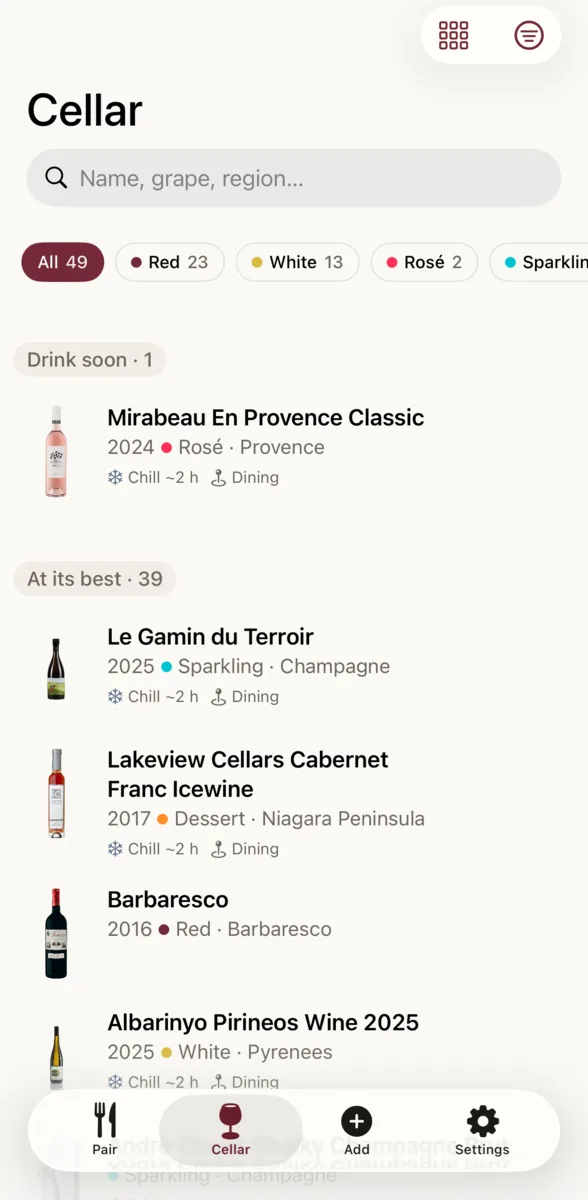
The cellar sorts itself into what's ready, what can wait, and what's quietly going over the hill. Each window is a best guess from the type, grape and region, and yours to change.
Drink windows Free
And everything else
The smaller things that make it a kitchen tool.
-
Open bottles
Mark a bottle opened and say how it's kept. CruSense counts down how long it stays good.
-
Finished, and rated
Finish a bottle and it moves to your history, with one tap to give it stars.
-
Search, filter, sort
Find a bottle by name, grape or region, narrow it to reds or whites, and sort by readiness, vintage, rating, price or date added.
-
Share a recipe
Share a recipe from Safari or any app, tap once, and CruSense opens Pair with the dish already typed in.
-
Siri and the widget
“Ask CruSense what goes with dinner” when your hands are covered in flour, and tonight's pick on your home screen.
-
Receipts and CSV
Snap a receipt and every bottle on it goes in at once, or bring a whole cellar over from a spreadsheet.
-
Where you buy wine
Tell it your country and up to five shops, and web finds look there first. In Finland, Alko's catalogue is built in.
-
Prices as you paid them
Each price keeps the currency it was in, and nothing is converted. Serving temperatures in °C or °F.
-
Offline, and backed up
Your cellar and the standard pairing live on your phone, with a backup that survives a new one. Scanning, web finds and Ask Cru need a connection.
Your food. Your wine. Paired.
Coming soon to the App Store, for iPhone
Free to download.
See what Premium costs